

In the world of streaming entertainment, choosing the right hardware is just as important as choosing a TV – and increasingly, the two go hand in hand. TV manufacturers partner with specific operating systems and then build them into their TVs. There are dozens of different streaming devices on the market today. But behind the illusion of choice, the market is ruled by the four biggest streaming platform brands: Roku OS, Amazon Fire OS, Apple tvOS, and Android TV.
But from the consumer’s point of view, does it all really matter? There may not be much of a difference between the hardware platforms – and most people don’t care as long as they can run Netflix or MAX on them. The devil’s in the details.
In this article, we take a deep dive and focus on the key differences between the Roku TV and Android TV platforms.
Hardware
Roku’s main hardware offerings are streaming sticks and boxes that can turn any TV with an HDMI port into a smart TV. The devices are easy to set up and use, perfect for users who want a plug-and-play experience.
Android TV is built into many smart TVs, offering a one-stop solution for consumers who want seamless access to streaming and smart home features without extra hardware. It’s also available in standalone streaming devices.
Examples of popular Android TV streaming sticks and boxes
- Chromecast with Google TV
- Xiaomi Mi TV Stick and Mi Box S
- NVIDIA Shield TV
- ONN. Android TV UHD Streaming Device
- Tivo Stream 4K

Chromecast TV
TV’s with Android TV built in
There are many companies releasing TVs with Android TV on board:
- Sony Bravia TVs
- TCL
- Hisense
- Philips
- Xiaomi Mi TVs
- Sharp
- Panasonic
- OnePlus TVs
TVs with Roku TV built in
TCL is one of the most prominent brands offering Roku TV, known for its budget-friendly and performance-oriented models.
Hisense also offers Roku TV integration in its budget and mid-range TVs, providing excellent value for money.
Additionally, Roku offers standalone streaming devices like the Roku Streaming Stick, Roku Express, and Roku Ultra, which can be connected to any TV with an HDMI port.
Roku Ultra 2024
The Roku Ultra 2024 is the top-of-the-line streaming device from Roku, designed for both enthusiasts and casual users. It’s packed with the latest technology to give you seamless access to your favourite content in the best quality.
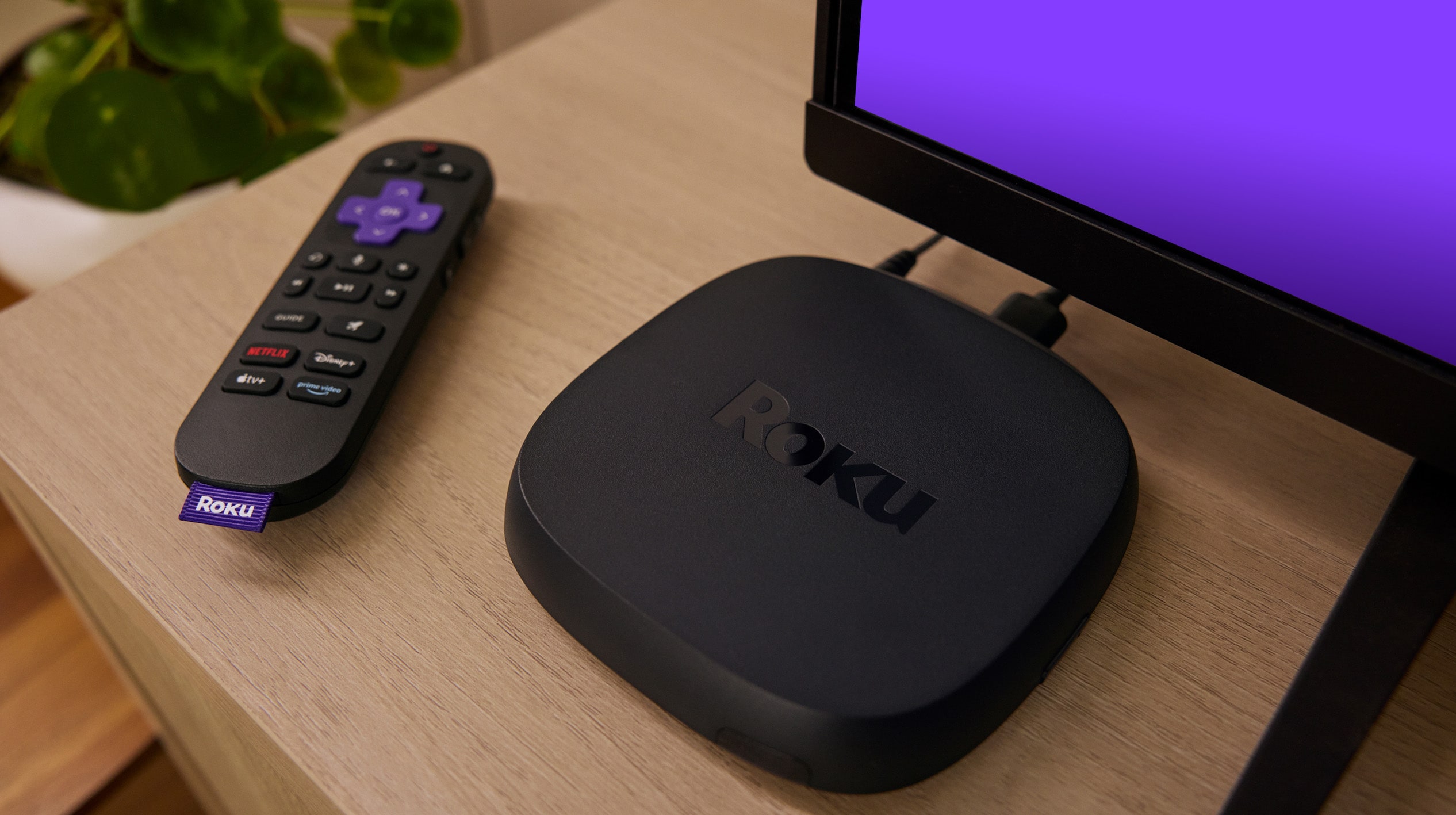 Roku Ultra (Source: Roku)
It supports 4K HDR, HDR10+, and Dolby Vision for amazing visuals with vivid colours and sharp details. For audio enthusiasts, it has Dolby Atmos support for immersive theatre-like sound.
Streaming content
Android TV’s app ecosystem is powered by Google Play, providing access to a vast array of apps, games, and services. This makes it a versatile choice for users who want a wider range of options, including niche or specialised apps.
Roku’s app store, called the Roku Channel Store, offers thousands of channels. However, its app selection can be more limited compared to Android TV. Despite this, Roku excels in offering popular streaming services and regional channels.
User interface
When it comes to Android TV and Roku, Roku is often considered the simpler one to use. This might be important for non-techy audiences or the elderly.
Roku looks like the interface most people know from cable TV systems: there is a list of all the installed channels (apps) on the home screen.
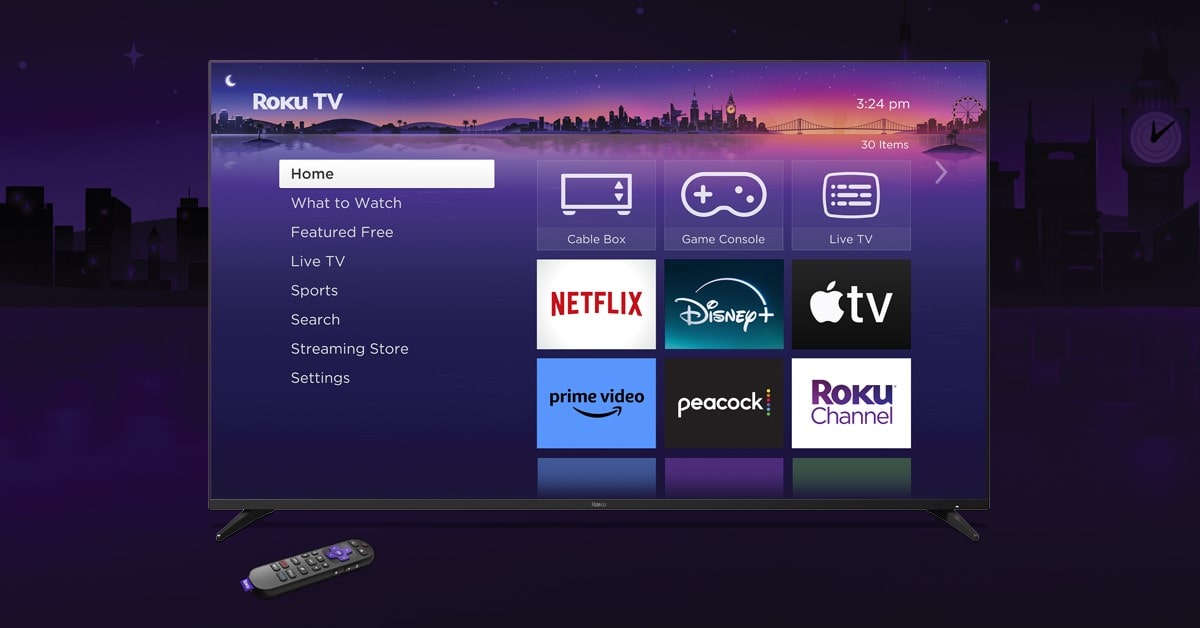 The Roku home screen can be easily customised to the viewer’s needs (source: https://arstechnica.com/ )
The home screen is focused on functionality, with options for settings, input sources and streaming channels all clearly labelled.
Users can quickly pin their favourite apps to the main screen for instant access, and the absence of heavy advertisements or overly dynamic content ensures a clutter-free experience.
Roku’s interface is also consistent across all devices, providing a familiar experience whether you’re using a Roku-enabled TV or a streaming device.
Android TV (or Google TV, as it’s now called since the launch of Google’s Chromecast TV device) has also undergone a visual overhaul.
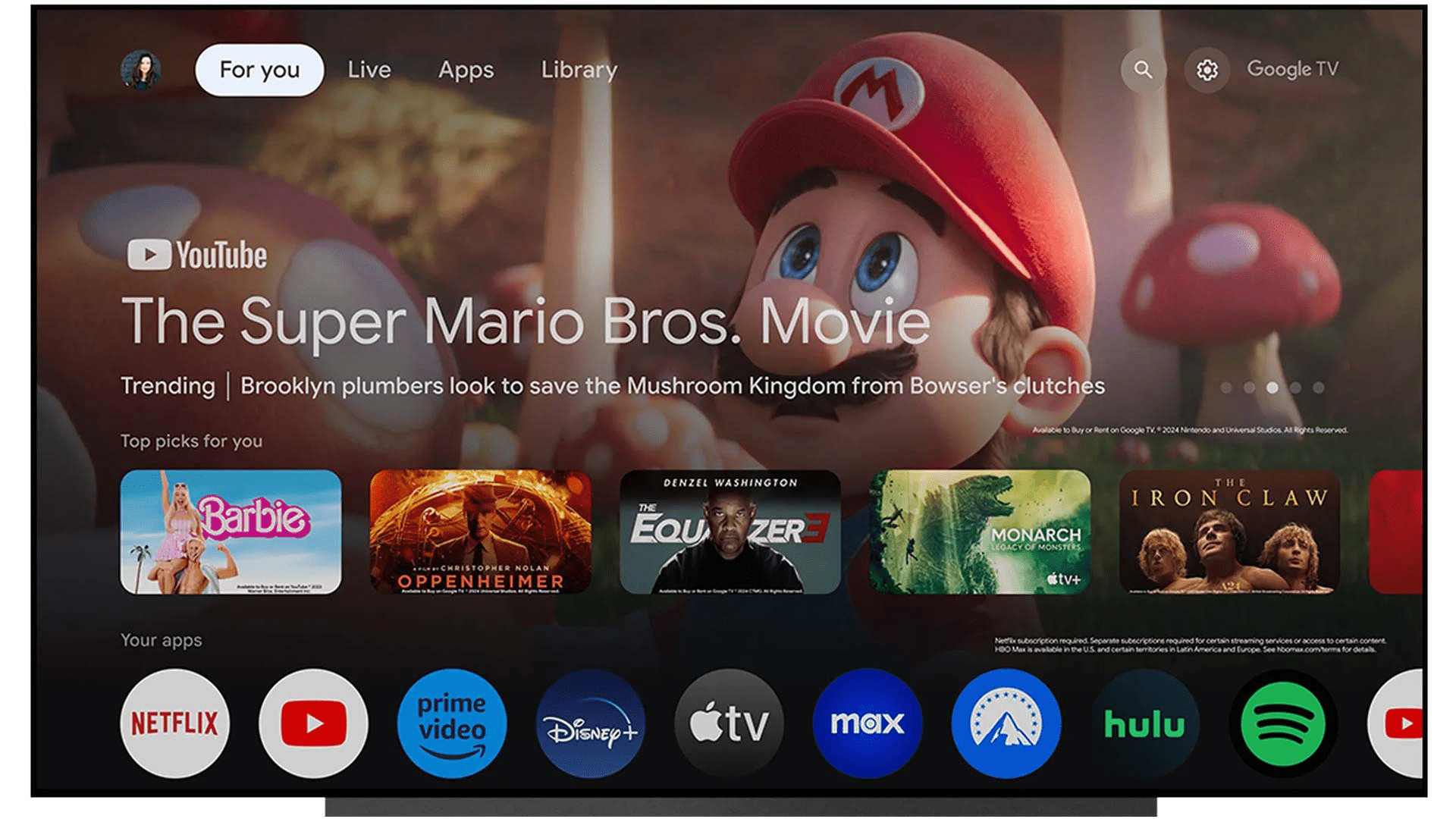 (source: https://www.aftvnews.com/)
The home screen is divided into rows, with prominent recommendations for movies, TV shows, and apps based on user behaviour and preferences.
This content-first approach aims to engage users with personalised suggestions powered by Google’s AI.
The interface also allows users to customise rows, rearranging apps and channels according to their preferences.
While the design is modern and visually appealing, it can sometimes feel cluttered, especially for users who prefer simplicity.
Voice assistants
Roku’s voice control is basic. You can search for content, control playback, and launch apps.
While it’s intuitive, Roku’s voice functionality is not as deep as other systems. Its integration with voice assistants like Alexa and Google Assistant is limited to basic commands, so it’s decent but not full-featured. The Roku voice remote (available with some models) is good but only for basic TV functions.
Android TV has an advanced voice control system with Google Assistant. You can search across multiple apps, control smart home devices, check weather, and ask general knowledge questions.
The deep integration with Google services gives you a seamless experience where you can interact with your calendar, reminders, and more directly from the TV. Android TV also supports hands-free voice commands on devices like the NVIDIA Shield TV and select models with built-in microphones.
Cost
Roku devices are generally cheaper than Android TV devices. Entry level Roku devices like the Roku Express start at around $30 so it’s a good option for budget conscious users. Even the top-end Roku Ultra is competitively priced, often under $100.
Android TV devices are more expensive, with entry-level devices like Chromecast with Google TV starting at around $50. High-end devices like the NVIDIA Shield TV can cost over $150.
Availability and popularity
According to the stats, in the North American region, Roku is the dominant streaming device, with a market share of 50% as of February 2023.
Roku is widely available in North America and Europe and is gaining traction in other regions. Its integration into affordable TV brands like TCL and Hisense has helped it gain popularity in regions where budget devices are in demand. But Roku is not available in Asia and other emerging markets as much as Android TV.
Android TV has a global presence thanks to its integration with major TV brands like Sony, Philips and Xiaomi. Its compatibility with Google services and wide range of hardware support makes it available in almost all regions. This global availability gives Android TV an edge in markets where Roku has not yet established a presence.
Gaming
Roku is not designed for gaming. While it has some casual games, it’s limited compared to Android TV.
Android TV has a full fledged gaming ecosystem with Google Play games and game streaming services like NVIDIA GeForce NOW and Xbox Cloud Gaming. It also supports external game controllers so it’s a better option for gamers.
Which one should you choose?
Choose Roku if you prefer simplicity, affordability and a no nonsense streaming experience. It’s for users who want to get straight to their content without navigating through complex menus.
Choose Android TV if you’re a tech enthusiast looking for a feature rich platform. It’s for households with Google services or those who want advanced features like gaming, smart home control and app customisation.
Both are good options for streaming but your decision depends on your budget, tech preference and the type of user experience you want.
Whatever platform you choose, we’re here to help – we have solutions for both Roku and Android TV. If you’re not sure which one is for you, our team can advise on the best option for your goals.
If you find this article valuable, you can share it on social media →
Read more about Roku topic!

Smart TV operating systems: which offers the best user experience?
Discover the best Smart TV operating systems in our expert analysis. Compare top platforms, focusing on user experience.
The end of Roku Direct Publisher channels: explore future alternatives
Discover the impact of Roku's discontinuation of Direct Publisher channels and explore robust alternatives.
Smart TV, Roku and Chromecast Explained
Ever wondered what's the difference between Smart TV, Roku, and Chromecast? We've got you covered!
Are you looking for a partner to build an application on Roku?
Leave your email and a short description about your project. We would gladly discuss different cooperation possibilities!