

The smart TV market is crowded with multiple operating systems like Android TV, Tizen, Roku, and Fire TV vying for attention. Among them is webOS which stands out for its easy-to-use design, smooth performance and integration capabilities.
What is webOS?
webOS is a smart TV operating system originally developed by Palm Inc. and later refined by LG Electronics. It’s the brain of LG’s smart TVs and has also been adopted by other TV brands. Known for its simple interface and smooth operation, webOS lets users easily access streaming services, apps and connected devices.
History of webOS
webOS started in 2009 as a mobile operating system by Palm Inc, famous for its tab-based multitasking. After Palm was acquired by HP in 2010, webOS briefly transitioned to tablets before being sold to LG Electronics in 2013. LG turned it into a smart TV platform focusing on simplicity and usability.
The first TV version released in 2014 introduced the Launcher Bar for quick access to apps and settings. Updates like Magic Link (2017) and Magic Remote improved navigation and content discovery. In 2021 webOS 6.0 adopted a full-screen home interface for better personalisation and content access.
In 2021 LG started to license webOS to other manufacturers and over the years webOS has evolved into a user-friendly feature-rich platform for modern entertainment needs.
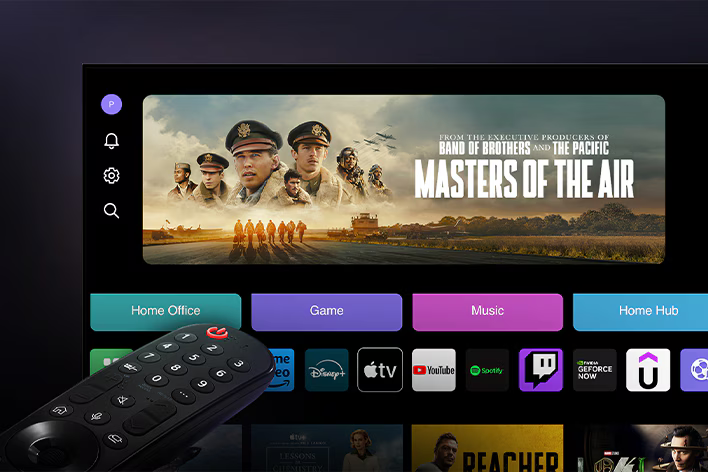
webOS currently. source: LG
Benefits of webOS
Originally developed by Palm and then refined by LG, webOS is the leading operating system for smart TVs and other connected devices. What makes it special?
User-friendly interface
webOS is designed to be easy to use with a clean and visually pleasing interface. Tab-based navigation makes switching between apps and content a breeze.
Comprehensive app ecosystem
The platform supports a growing ecosystem of apps including popular streaming services, games and productivity tools. Developers can use clear SDKs and documentation to build apps that increase user engagement and monetisation opportunities.
Optimised performance
webOS is built for performance with fast boot times and smooth transitions between apps. Its lightweight architecture ensures low resource consumption making it a reliable choice for manufacturers and a pleasant experience for users.
Cross-device integration
One of the standout features of webOS is its seamless integration with other devices. From smartphones to IoT devices, webOS supports seamless connections, allowing users to control their smart home ecosystems through a unified interface.
Customisable for branding
Manufacturers can customise webOS to fit their branding needs. Its flexibility allows companies to create a unique look and feel while still using the core functionality of the platform making it perfect for white-label solutions.
Developer-friendly environment
With its open-source approach, webOS encourages collaboration and innovation. The platform supports popular technologies like HTML5, CSS, and JavaScript, lowering the barrier for developers to build and deploy apps.
AI and voice integration
webOS uses AI and voice recognition to offer features like content recommendations and hands-free control. These features improve the user experience and add a layer of personalisation to smart devices.
Regular updates and security
LG keeps webOS secure with regular updates. These updates fix issues and add new features so the platform stays reliable.
Customisability for manufacturers
One of webOS’s best features is its flexibility for OEMs (Original Equipment Manufacturers). Device manufacturers can customise the platform to match their brand identity and requirements. They can create unique experiences while leveraging webOS’s core functionality.
Future-ready design
With support for latest technologies like 4K, 8K, HDR and Dolby Atmos webOS is ready for the future of entertainment. It provides users with a high quality video and audio experience and is flexible to emerging trends in content consumption.
webOS TV system components
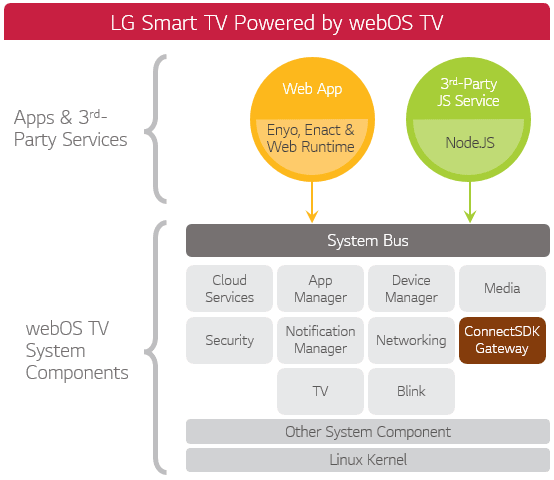
webOS TV is built on a modular architecture that integrates various components to enable seamless operation of applications and services.
source: LG
Web apps for webOS TV are built using frameworks like Enyo and Enact, which use the System Bus to access system features. Developers can also expand app functionality with third-party services, thanks to Node.js support.
The System Bus acts as a central hub, enabling communication between apps, services, and core system components. These components include:
- Cloud Services: For data synchronisation.
- App and Device Managers: To handle apps and connected devices.
- Media and TV Frameworks: For playing content and supporting broadcast features.
- Security and Networking: To ensure secure connections and reliable network performance.
- ConnectSDK Gateway: For integrating external devices like smartphones and streaming tools.
At its foundation, webOS TV uses the Blink web rendering engine and a Linux Kernel to manage hardware and essential system operations. This structure ensures a smooth, reliable, and user-friendly experience for both apps and services.
webOS apps
webOS web apps are very similar to standard web apps. webOS TV supports standard web technologies like HTML, CSS and JavaScript. Anyone with web app experience can start developing webOS apps. webOS apps for LG can be implemented using various JavaScript app frameworks like Enact, jQuery, etc.
Basic web app
A basic web app for webOS TV, also known as a packaged web app, is delivered as a complete package.
This package contains all the necessary resources for the app. When a user downloads and installs the app, these resources are installed on their device. Any updates to the app’s code or resources require submitting a new version of the package with the changes included.

source: LG
Hosted web app
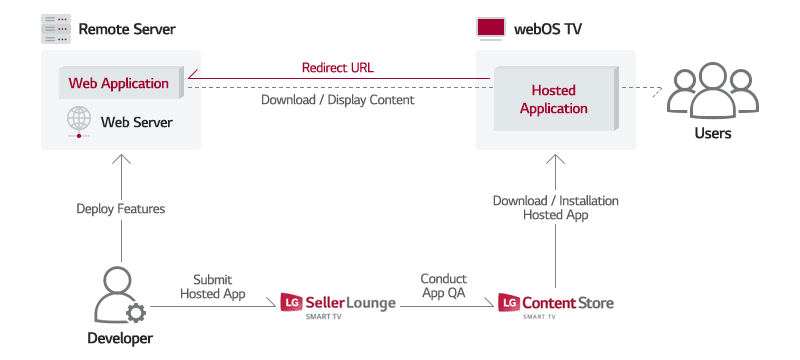
A hosted web app stores its content on a remote web server. It consists of a lightweight local app that users download and install on their devices, along with the web app hosted on the server.
When the user opens the local app, it redirects to the web app’s URL on the server. The necessary resources are then downloaded from the server to the device.
source: LG
LG’s AI-driven features
LG continually improves its smart TV ecosystem by integrating innovative AI technologies that enhance user interaction and personalisation.
AI Picture Wizard
This feature allows users to customise their viewing experience by analysing content and environmental conditions to automatically adjust image settings. AI Picture Wizard fine tunes brightness, contrast and colour temperature to provide optimised settings for movies, sports and more.
AI Concierge
AI Concierge is a personalised assistant that provides tailored recommendations based on user preferences and viewing habits. This feature ensures quick access to relevant content and user satisfaction.
AI Chatbot
AI Chatbot enables conversational interaction with the TV, making it easier to navigate, search for content or adjust settings. Users can ask questions, get recommendations or control smart home devices directly through the chatbot, for a seamless voice control experience.
Pilot AI Magic
AI Magic Remote simplifies remote control by combining gesture recognition and voice commands. Users can control the TV or navigate menus with minimal physical input, making it more accessible and user friendly.
Quick Card
Quick Card organises frequently used apps, settings and features into a dashboard. Thanks to AI, the app adapts to user priorities over time and selects the most relevant shortcuts, providing quick access to your favourite content and services.
LG Home Hub
The LG Home Hub is the brain of LG’s smart TV ecosystem, combining entertainment with smart home control. It’s a central control centre where users can monitor and manage their connected devices from their LG Smart TV.
Home Hub connects to a wide range of IoT devices like lights, thermostats, cameras and appliances, supporting Matter and ThinQ. Users can control these devices through an on-screen interface.
Home Hub works with AI assistants like Alexa, Google Assistant and LG’s AI Chatbot for hands-free control of the TV and smart home devices.
LG Magic Remote
LG’s Magic Remote is a great accessory and one of the strongest points of LG TVs. It comes with all LG OLED TVs and many LCD TVs. However, if your LG TV doesn’t come with one, it can still be bought separately (and used if the TV is compatible).
The Magic Remote works like a computer mouse. You can point, click, and scroll on the TV screen, making it simple to move through menus or type something. It’s way easier to use than most regular remotes.
With Quick Access, you can customise the number buttons (1-8) to go straight to your favourite apps, channels, or inputs. Just press the button, and you’re there – no need to scroll or search!
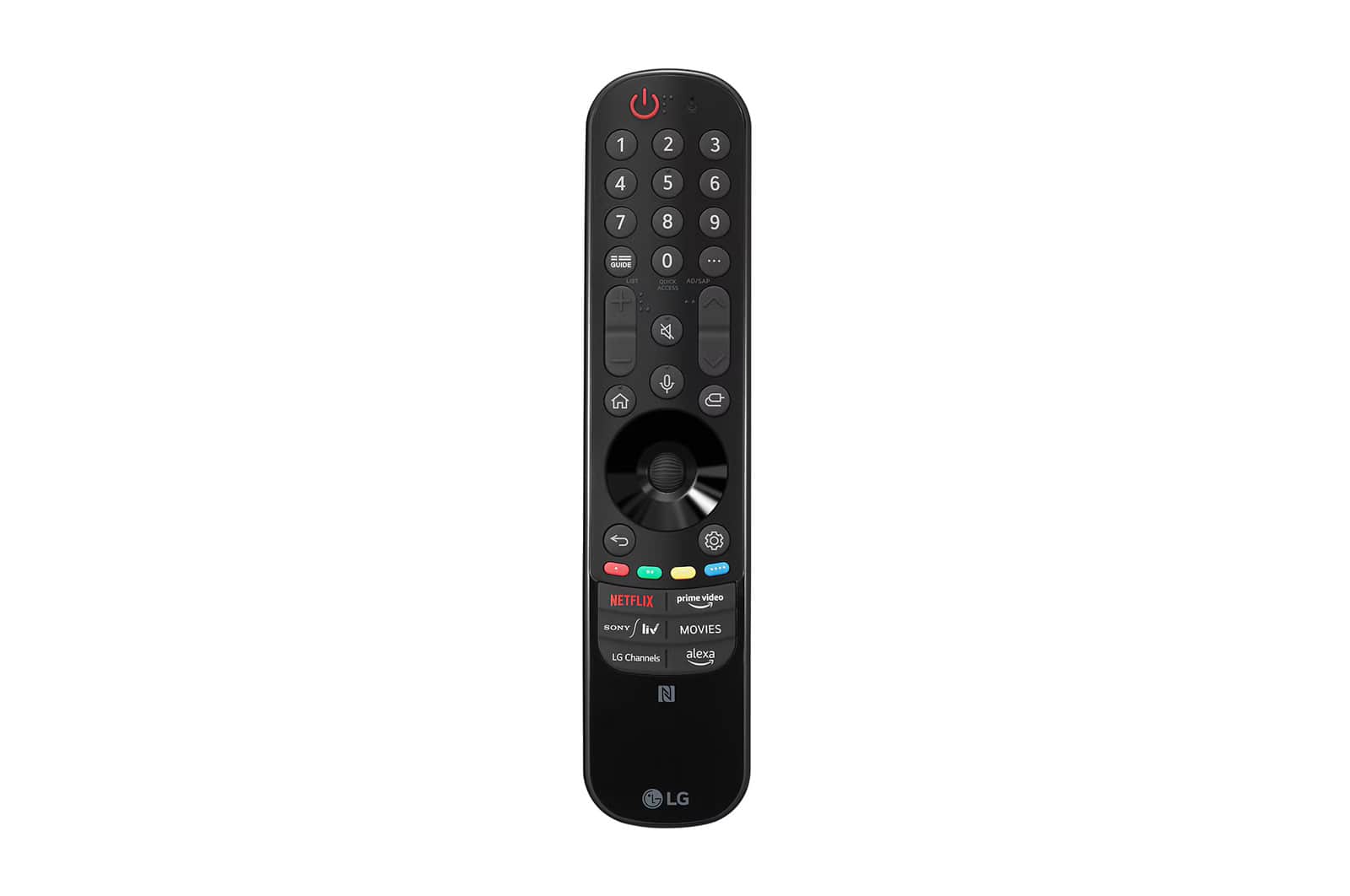 LG’s 2024 Magic Remote
Voice control
The LG Magic Remote has voice control features for easy interaction with your TV and smart home devices. By pressing the microphone button, users can search for content, adjust TV settings and control connected devices with natural voice commands. For example, you can find movies, switch inputs or dim the lights with simple instructions. The remote integrates with LG ThinQ AI and supports multiple languages.
So, is it worth developing apps for webOS?
Yes, and here’s why. webOS has become a versatile, developer-friendly platform that offers significant opportunities for businesses and creators.
With LG licensing webOS to third-party manufacturers, the platform’s reach has expanded far beyond LG’s offerings, becoming one of the most popular smart TV operating systems in the world. This growth means your apps will reach a larger audience and you will gain more potential sources of income.

In addition to TV manufacturers, LG has established partnerships with many technology and content providers to significantly grow its presence in the home entertainment market.
Collaborations with major streaming services like Netflix, Prime Video, YouTube, Rakuten TV, and DAZN give users access to a vast library of content tailored to diverse tastes and viewing preferences.
Partnerships with innovators like CEVA, Gracenote, and Nuance highlight LG’s focus on advanced features, including AI-powered content recommendations, voice recognition, or cross-device compatibility.
Conclusion
Since smart TV app development is still a largely unexplored territory, the importance of finding the right development partner is even higher. But the rewards for early adopters are big. For TV manufacturers and brands, this is a chance to be pioneers in a growing market.
If you’re thinking of building a webOS app, weigh its pros and cons and see how it fits your needs. LG’s webOS is becoming a strong competitor to Android TV, with exciting possibilities for app development.
If you are a publisher or media company thinking of launching your own app, we can help you. Contact us today to schedule a call – our experts are ready to talk to you!
If you find this article valuable, you can share it on social media →
Read more about the Smart TV applications!

What is Titan OS and what do we know about it so far?
Explore what distinguishes Titan OS, a new smart TV operating system. Discover its unique features before giving it a try yourself.

Smart TV operating systems: which offers the best user experience?
Discover the best Smart TV operating systems in our expert analysis. Compare top platforms, focusing on user experience.
7 Smart TV Features for a Seamless Streaming Experience
Discover emerging opportunities in the Smart TV market. Find out how service providers can leverage enhanced Smart TV features to stay ahead.
Are you looking for a partner to build an application on Smart TV?
Leave your email and a short description about your project. We would gladly discuss different cooperation possibilities!